0.5New status board · macOS & Windows

All your Claude Code sessions. On deck.

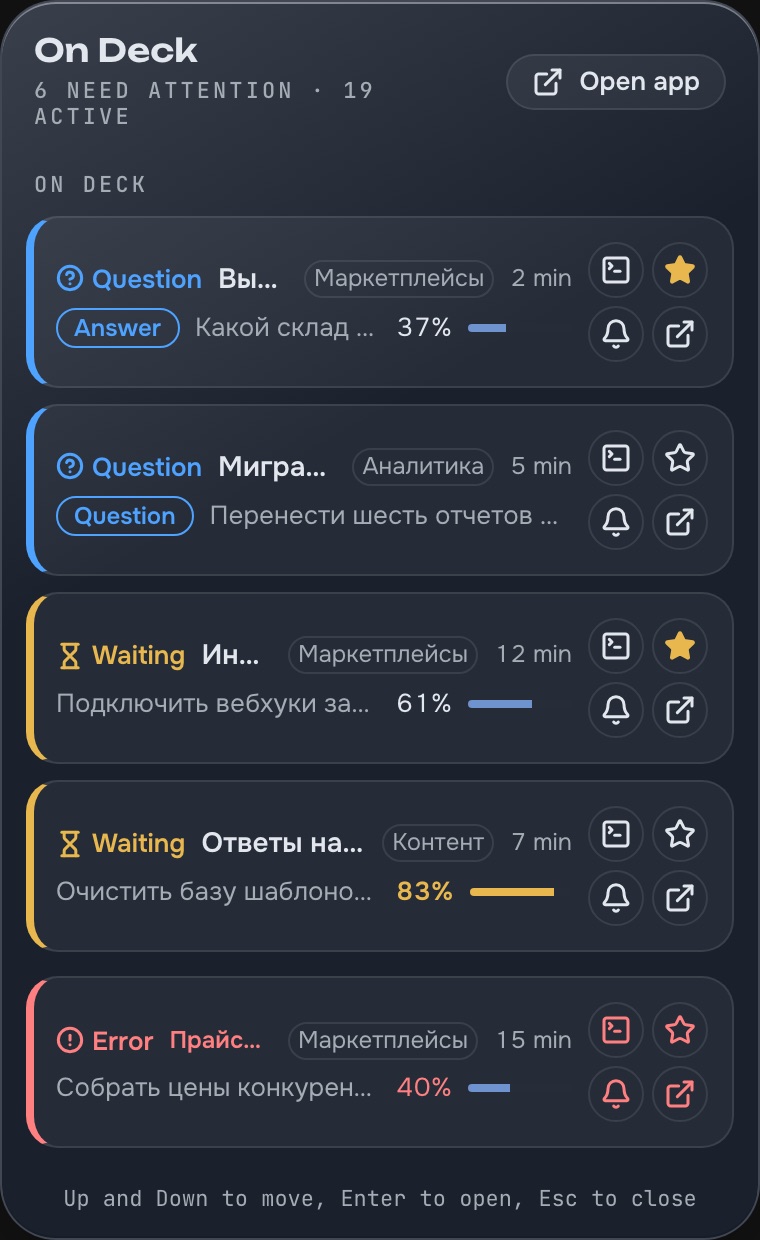
Running several Claude Code sessions at once? On Deck shows what each one is doing and takes you back to the right terminal in one click.

Free during beta · runs locally · not affiliated with Anthropic
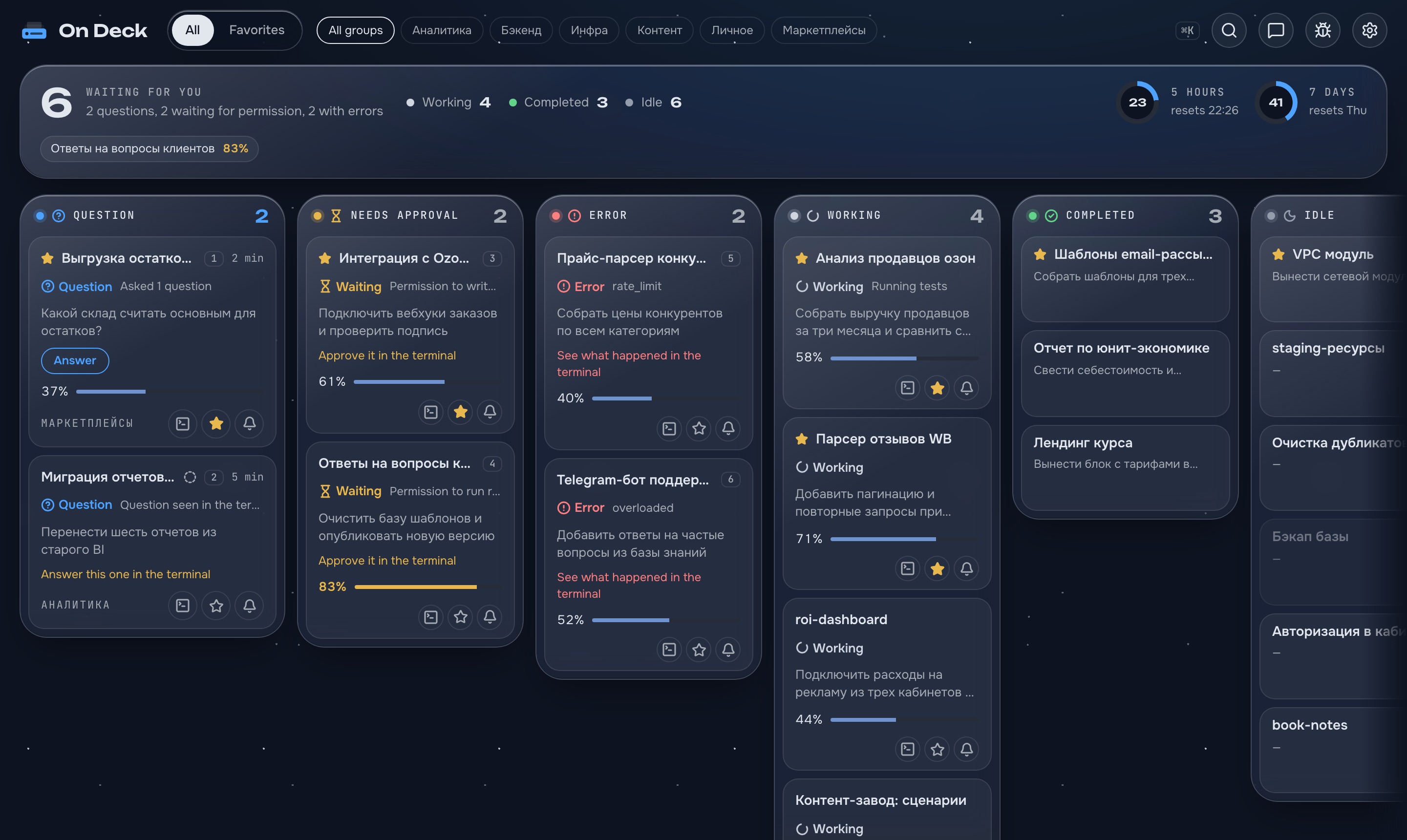
On Deck status board: sessions sorted into Question, Needs approval, Error, Working, Completed and Idle columns
01Why On Deck

Five terminals. One of them has been waiting for you for 20 minutes.

Without On Deck
⌘Tab ×40You cycle through tabs to see who has finished.
20 minA question sits in a background tab — the session stands still.
91%Context and limits run out without warning.
With On Deck

Every session is a card that moves to its status column by itself. The status comes from Claude Code’s own events, never guessed.

QuestionAnswer it right in On Deck
ApprovalWaiting for you to allow a command
ErrorRate limit or failure — with the reason
WorkingWhat it is doing now
CompletedTime to look at the result
IdleOpen, waiting for nothing
02Features

What On Deck does

01of 08

03How it works

It watches. It never runs or replaces anything.

Claude Code keeps running exactly as before, in your terminals. If On Deck is closed or crashes, your sessions won’t notice.

Install and open

The icon appears in the menu bar (Mac) or the notification area (Windows).

Review and connect

On Deck shows the exact changes to ~/.claude/settings.json, backs it up, and only then adds its hooks. Uninstall restores it.

Work as usual

Start Claude Code anywhere — sessions show up on the board by themselves, running ones too.

Claude Code→hooks · status line→127.0.0.1→On Deck

Hooks are asynchronous: Claude Code never waits for On Deck. Events go only to a local address on your machine, with an access token.

04Privacy

Your code and prompts stay on your machine

On Deck does

Runs locallyNo account, no cloud
Only 127.0.0.1Events are accepted locally, with a token
Backs up settingssettings.json changes only when you click
Anonymous countsNo prompts, names, paths or code. Can be turned off

And deliberately doesn’t

Doesn’t run sessions
Isn’t a terminal
No git, no diffs
No AI summaries
Never guesses — “—”
Full list: what On Deck collects →
05Install

First launch in a minute

On Deck isn’t notarized by Apple or code-signed for Windows yet, so the system asks once whether you trust it.

macOS 15 and later

  1. Open the DMG and drag On Deck into Applications.
  2. Open On Deck. When macOS blocks it, click Done.
  3. System Settings → Privacy & Security → Open Anyway.
  4. Confirm with your password or Touch ID — from then on it opens normally.

Or in one line in Terminal:

xattr -dr com.apple.quarantine "/Applications/On Deck.app"

Removes the “downloaded from the internet” mark from On Deck only. Gatekeeper stays on.

Requirements

macOS
Apple Silicon (M1 or later)
Windows
10 or 11, x64 · beta
Claude Code
2.1 or later
Terminal
Mac: tmux in iTerm2 or Terminal.app — to jump to the exact pane
06FAQ

Your questions, answered

Didn’t find it? Write to the developer — a real person replies.

Talk to the developerUsually replies within a day
Message on Telegram → or in the app: the bug button

Yes — On Deck is free on macOS and Windows during the beta.

No. Hooks are asynchronous — Claude Code posts an event and moves on. The only exception is a question you chose to answer in On Deck.

Nothing: sessions keep working. Open it again and it finds running sessions on its own.

Your latest prompt is shown as the task name — only on your screen. Only anonymous usage counts leave your machine, and you can turn them off.

On Deck isn’t notarized by Apple yet — that needs a paid developer account. See Install for how to allow it once.

Statuses work in any terminal. Jumping to the exact pane on a Mac uses tmux in iTerm2 or Terminal.app; on Windows On Deck brings the session’s terminal window to the front.

No. On Deck is an independent project, not affiliated with Anthropic.

Let your sessions wait for you — not the other way round

PRODUCT HUNT · link on launch day